
Deploying a Decision Model and Notation (DMN) project as an AWS Lambda Function is only half of the process. This article focuses on executing your DMN service, request formatting, and response handling.
When you deploy a DMN model as an AWS Lambda Function, you'll receive a unique execution URL that allows you to execute your DMN model as an AWS Lambda Function.
Preparing the Execution Request for AWS Lambda Function
Request Details
- URL: Your unique AWS lambda Function execution URL

- Method: POST
- Content-Type: application/json
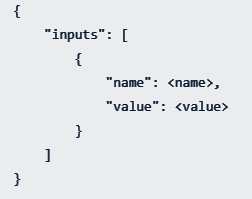
- Body: The original input should be re-formatted as below, surrounded by an input tag for the request body.
Response Structure from AWS Lambda Function
A successful DMN service execution returns a response as follows.

Response Key Components
- isCanceled: Indicates execution status
- notification: notification array if there is any notification defined in the model
- invocationId: Unique identifier composed of:
- RequestId: Azure platform generated
- RunId: FlexRule engine execution identifier
- elapsed: Execution time duration
- runtimeVersion: FlexRule Runtime version
- outputs: Decision results array
Summary to Execute the DMN Service as an AWS Lambda Function
Once you deploy your DMN model as an AWS Lambda function, you will receive a unique execution URL that allows you to invoke the decision service as an AWS Lambda function. By setting the required input parameters and posting your request, you can get the desired response and its details.


