
When working with Decision Model and Notation (DMN) models, you often need to track changes, collaborate with team members, and manage multiple versions of your DMN model. FlexRule Designer makes this easy by integrating Git-based source control directly into your modeling environment.
Adding Source Control to Your DMN Project
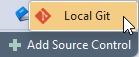
To start managing versions of your DMN models, you need to add source control to your project. Open your project in FlexRule Designer and click on the Add Source Control button at the bottom of the window.

Then select Local Git as your version control system.
Once added, you’ll see source control options, such as:
- Number of commits waiting to be pushed
- Number of files modified and waiting to be committed
- The current branch you have checked out

This setup allows you to manage your DMN project just like any software project, using familiar Git workflows.
Commit Changes to the Source Control
After making changes to your DMN models:
- At the bottom of the screen, you’ll see the number of changed files.
- Click this indicator to open a window listing all changed files.
- You can:
- Commit and Push: Save changes locally and push to a remote repository if set any.
- Commit: Save changes locally
- Show Changes: Compare your changes with the previous version
- Select All / Deselect All: Choose which files to commit
- Commit Message: Add a meaningful comment to describe your changes

To push your changes, you need to connect to a remote repository. Another article will cover this.
Summary
Using FlexRule Designer’s built-in Git integration, you can easily version, track, and collaborate on your DMN models. Adding source control is simple, and committing changes is easy for both technical and non-technical users to manage the evolution of the DMN model over time. This ensures your DMN models remain organized, transparent, and ready for collaborative modelling.


