
A DMN Boxed Relation is a vertical list of objects mapped to a context document. For more information on context documents, see Fact Concept.
DMN Boxed Relations offer a straightforward visual format for defining relations to a context document. Objects and attributes are displayed in a table. The first column displays the relation name, while the second column holds its corresponding objects.

Add to a Boxed Expression
While in a boxed expression document: drag and drop the boxed relation from the toolbox into the document.
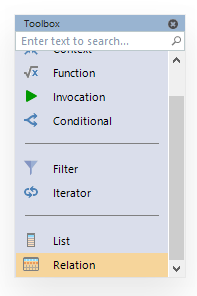
Set the concept document to assembly and type in the properties window.

Set the value to copy to an output parameter.

Then, add objects with their attributes.

Add the Boxed Relation to a DRD
Add the boxed expression as a node in the DMN project's DRD. Drag and drop the Boxed Expression to a business knowledge node in the DRD.

Give the business knowledge node a name and reference that name in the associated decision as if calling a function and set the result of the decision to a parameter.

Run the project and view the parameters window. You can view the relation objects in the parameter.

For more information on this, see the FlexRule Resource Hub article on the DMN Decision Requirement Diagram.
Summary of DMN Boxed Relations
A Boxed Relation is a visual table in a Boxed Expression that maps objects and their attributes to a context document, making it easy to define structured relationships. To use one, drag the Boxed Relation into a Boxed Expression and set the concept document and type in the properties. Then add your objects with attributes. This expression can then be added to a Decision Requirement Diagram as a business knowledge node, referenced in a decision, and its results viewed as parameters when the project runs.


