
Deploying a Decision Model and Notation (DMN) project as a Google Cloud Function is only half of the process. This article focuses on executing your DMN service, request formatting, and response handling.
When you deploy a DMN model as a Google Cloud Function, you'll receive a unique execution URL that allows you to execute your DMN model as a Google Cloud Function.
Preparing the Execution Request for Google Cloud Function
Request Details
- URL: Your unique Google Cloud Function execution URL

- Method: POST
- Content-Type: application/json
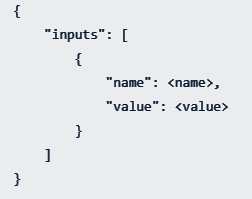
- Body: The original input should be re-formatted as below, surrounded by an input tag for the request body.
Response Structure from Google Cloud Function
A successful DMN service execution returns a response as follows.

Response Key Components
- isCanceled: Indicates execution status
- notification: notification array if there is any notification defined in the model
- invocationId: Unique identifier composed
- RequestId: Azure platform generated
- RunId: FlexRule engine execution identifier
- RequestId: Azure platform generated
- RunId: FlexRule engine execution identifier
- elapsed: Execution time duration
- runtimeVersion: FlexRule Runtime version
- outputs: Decision results array
Summary to Execute the DMN Service as a Google Cloud Function
Once you deploy your DMN model as a Google Cloud function, you will receive a unique execution URL that allows you to invoke the decision service as a Google Cloud function. By setting the required input parameters and posting your request, you can get the desired response and its details.


