
The Friendly Enough Expression Language (FEEL) is the expression language of Decision Model and Notation(DMN), and String operations are heavily used when writing expressions to model business decisions. This article provides a guide on how to use FEEL String operations in different use cases when modeling business decisions using DMN. And also, we use built-in string functions available in DMN, which we discussed in this guide.
What Is a FEEL String?
A FEEL String is any sequence of characters enclosed in double quotes, for example: “Hello Emma-Jane!”. FEEL strings can be used directly in inputs, decision tables, literal expressions, and more. They are fundamental for most DMN decision models.
Use Cases for FEEL String in DMN
Dynamic Message Generation
We can generate tailored messages for users or downstream systems based on decision outcomes. Let's say we need to create a custom email or notification formatting based on the parameter UserName= “James” and DecisionStatus=”Approved”
"Dear " + upper case(UserName) + ", your application has been " + DecisionStatus + "."
Output:
"Dear JAMES, your application has been Approved."
Routing Logic Based on Text Content
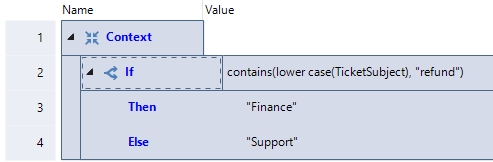
We can use FEEL String in conditional expressions. Let's say we need to route tickets based on subject line and we have an input parameter called TicketSubject = “I would like to apply for a Refund”
Data Masking
And also we can mask portions of sensitive data in a string, e.g. showing only the last 4 digits of an account number.
AccountNumber= ""ACCN500-1587-5687"
"***" + substring(AccountNumber, string length(AccountNumber)-3, 4)
Output: "***5687"
Transformation of String values
We can also standardize string values (e.g., making everything lowercase or trimming whitespace) before logic execution for consistent matching and reduced errors. Let's say we need to normalize user-entered email addresses.
UserEmail = " PeterBob@gmail.com "
trim(lower case(UserEmail))
Output:
"peterbob@gmail.com"
Summary
You can use FEEL String expressions in your DMN models in many ways, not limited to the above use cases. Combining String expressions with built-in String functions enhances the business decision modeling capability in DMN.


