
When you have a Decision Model and Notation (DMN) model, after validating the logic documents, it’s time to run your model. Running your DMN model locally in FlexRule Designer is straightforward, with the help of the integrated FlexRule Runtime Engine. FlexRule is the only .NET DMN Engine with Conformance Level 3 (CL3).
Open the Entry Logic Document
Open the entry logic document associated with your DMN model. This is typically a Decision Requirements Diagram (the main logic document that inter-connects decisions such as Decision Tables, reusable sub-DRD, Business Knowledge, and other decision nodes) that acts as the starting point for execution.

Run the Model
Simply click the Run button in FlexRule Designer’s toolbar. This triggers the integrated FlexRule Runtime Engine to execute your DMN model.

Provide Your Input Data
When you click the Run button, you will be asked to provide the necessary input values for your model; please ensure all the required input values are provided. You can enter these inputs directly in the Value Composer window, which allows you to specify values for each input parameter your DMN model requires.

If you have input values saved as a JSON file, you can simply load that file into the value composer.

You can save the input values you entered as a Run Template to run the model next time.
After you provide all the input values, click the Ok button, and the FlexRule Runtime Engine will run your model using those input values.
What Happens After Running?
Successful Execution
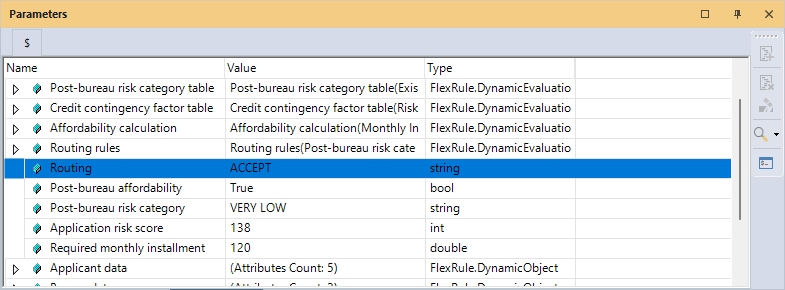
The FlexRule Runtime engine processes your inputs through the DMN model and displays the results directly in the Parameters window. A success message window confirms the execution completed without issues.

Error Message
If any exceptions or errors occur during execution, a popup window will appear showing detailed error information. This includes which part of the model caused the issue, helping you quickly identify and fix problems.

Summary
Running your DMN model locally in FlexRule Designer is straightforward. You just need to click Run, enter inputs, and review the results. This simplicity lets you focus on refining your DMN model without worrying about complex deployment or execution steps.


