
Importing a JSON file to create a fact concept for a DMN model is a straightforward and safe way to make an input structure. Creating a fact concept helps to understand the input data's relationships, structure, and constraints. Importing a JSON file automatically makes a Fact Concept.
Import a JSON File to Create a Fact Concept
The image below is a sample JSON file, which is an input for a decision model.

There is an option in FlexRule Designer to import a JSON file. A user can click on the import on the Fact Concept and click on the JSON Data.

After selecting the JSON file, you can see a fact concept that is automatically created.

It’s important to note that you can add constraints to the Fact Concept. This allows you to adapt validation rules to different scenarios as needed.
Using the created fact concept in the Decision Model and Notation
Add a Decision Requirement Diagram (DRD), then open the toolbox, and drag and drop an input data into the flow.

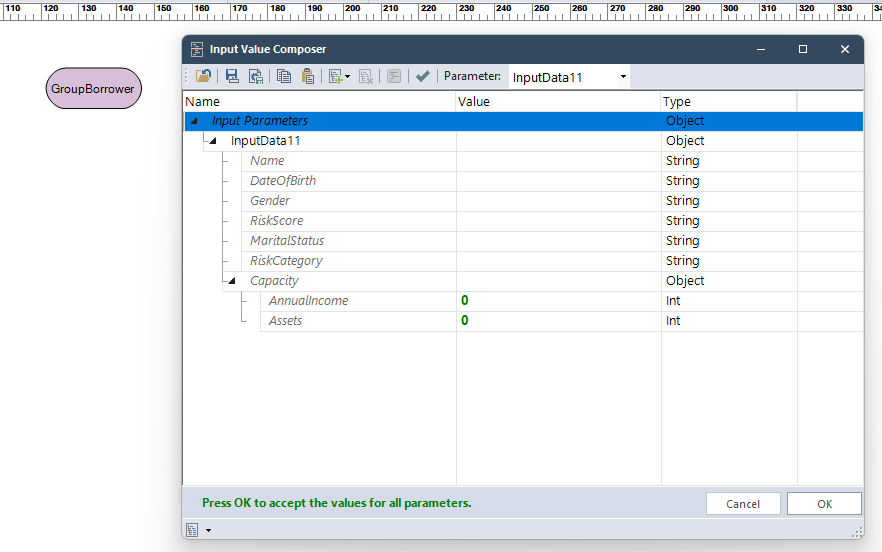
Select input data and add the created fact concept to it. When you run the model, it expects input that matches the structure defined.
Summary
Input data in DMN models by importing a JSON file ensures that the required data matches the defined standard. It is simple, fast, and it makes sure you have not missed any data.


