
Connecting an XML file to a DMN project is a simple task in the FlexRule platform. The data can be mapped out and manipulated in however your project requires. An XML file can be accessed in FlexRule to create a text object.
Add an Activity Flow to your DMN Project
Add an Activity Flow by selecting the Add New Document icon in the project explorer, and you can find it under Business Logic. Or if you already have an activity flow where it makes sense to add the file node, you can add it there.

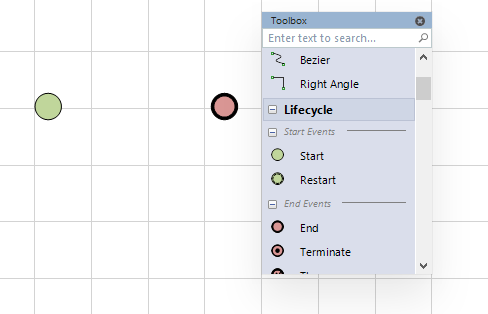
In the activity flow be sure to add a start and end node because every activity flow requires one. Open the toolbox with Alt+x
Add an XML File to a DMN Project
Scroll down in the toolbox to the Data section and add a file node to the flow.

Select the node and in the properties window to the left and fill in informaiton for Type, CopyValueTo, and URI.
Set Type to XML.

Enter the file location into the URI field, and the data will be copied into the parameter entered into the CopyValueTo field.
An XML File as Input
Using the Age Classification sample project as an example, we can take in an XML file as input to the DRD. To do this, create a flow, add a file node, and drag and drop the DRD into the flow. Create a parameter to store the XML file. Use this example file as input for the Age Categorization project:
<people>
  <person id='pn101'>
    <name>Andrew Galloway</name>
    <age>30</age>
  </person>
  <person id='pn102'>
    <name>Stephen Farrelly</name>
    <age>20</age>
  </person>
</people>
Fill in the correct settings in the parameters window:

Debug the project and use the data viewer on the people parameter to view the XML file.

Add a Spread Sheet to a DRD
After importing a spreadsheet into a flow, you can alternatively drag and drop the flow into the DRD orchestrating the DMN project.
Summary
Connect to XML filetypes in DMN projects using the File node of an Acitivity Flow logic document. If your main orchestration for a DMN project is a DRD you can create an Activity Flow with a File node, and drag-and-drop it into your DRD. Debug the project (or run it) to view the XML file values in the parameter window and data viewer.


