
Boxed Expressions Overview
In our previous post on Decision Model and Notation – DMN, we discuss that the shareable components between Decision Requirement Diagrams (DRDs) are either decisions or Sub-DRDs. Now, the challenge is, how we can share our business formulas across different DRDs for different business decisions?
The answer is to use Boxed Expressions.
DMN provides a simple visual-tabular format for all decision logics, called boxed expressions.
A simple Boxed Expression is a 2-column table: the first column is ‘Name’ and the second column is ‘Value’ and/or expression. We have several types of boxed expressions, including context, function, iterator, invocation and conditional expressions and so on.
Simple Example
This is an example of a Boxed Expression:
As a part of a project, we need to calculate a Daily Car rate. And Daily Car rate has a fixed formula across different decisions (i.e., Decision Tables, Tree, Natural Language, etc.). The Daily Car rate formula is: Car rate + GPS base rate
For implementing this Formula, we create a new Boxed Expression and add all our formulas as follows:
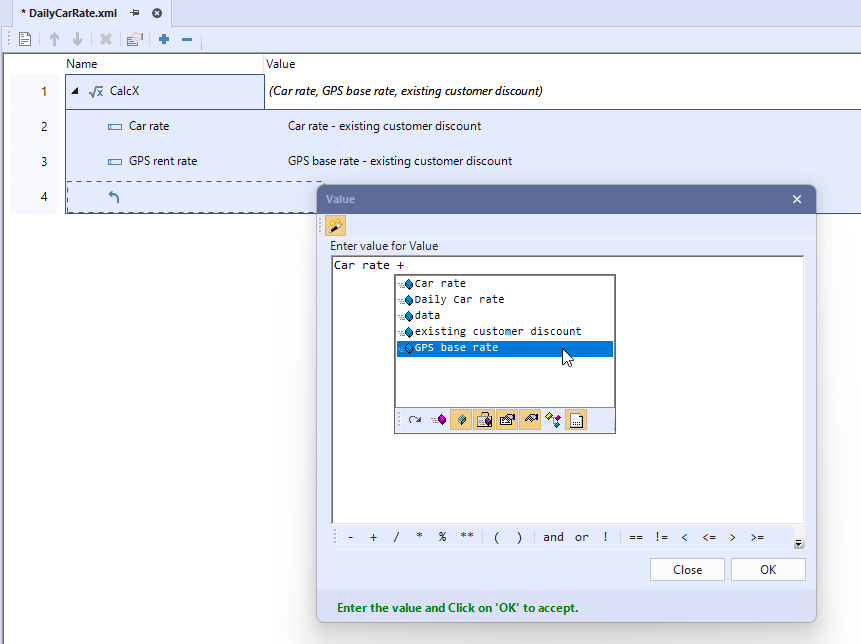
After creating a boxed expression, we can now use them in our project. For example, as the screenshot shows below, we can call the “Daily Car rate” directly. And in this case, for calculating the “Daily Car Rate” it will calculate the “Car rate” and “GPS base rate” first.
In this example, we call the “Daily Car Rate” in a DRD as shown below. Please note that boxed expressions can be used in all other types of logic:

Depending on the values for “Car rate” and “GPS rent rate”, we will have the “Daily Car Rate” value.
Types of Boxed Expressions
We have different types of Boxed Expressions:
- Context – collection different entries and different values.
- Function – similar to what we used in our example.
- Invocation – invoke any function (i.e., Decision table, FEEL expressions)
- Conditional – Provides a graphical depiction of an If statement across three rows.
- Filter – Provides a graphical depiction of filtering within a collection.
- Iterator – Provides a visual representation of an iterator statement with three variations: for loop, quantified expression (some), and quantified expression (every).
- List – list of various items
- Relation – A sequential array of uniform horizontal contexts.
Book a Custom Demo
Difference among Business Boxed Expressions
Now the question becomes, what are the differences among different kinds of Boxed expression in DMN?
The answer is that each of them is focus on the different decision logics. So, with using different boxed expressions, the user can cover all the decision logics which leads to model the different decision models. On the other hand, Boxed Expression is designed for sharing expressions across all models.
Conclusion
Boxed Expressions allow the sharing of logic (i.e., constraints and conditions, formulas, conditional, values, expressions., etc.) across your models. Once these are modeled, they can be reused over and over with business people without worrying about hidden complexity and runtime expression bindings.
There are many different types of boxed expressions, to learn more please visit our Resource Hub.
Last updated January 21st, 2025 at 06:43 am Published July 6th, 2016 at 06:56 am




